Fedora Linux は Red Hat 社が支援するコミュニティ Fedora Project で開発されている Linux ディストロです。このディストロは、最新の技術を積極的に取り込むことで知られています。Fedora Linux の開発成果は CentOS Stream に取り込まれます。ここでテストを経て最終的に Red Hat Enterprise Linux, RHEL へ反映されます。Fedora Linux は、おおむね春と秋の年二回の頻度で新しい版がリリースされています。
Fedora Linux 42 の開発スケジュール [1] によると、ベータ版の公開は 2025-03-11、正式リリースは 2025-04-15 に予定されています。
2025-02-04 に、Fedora Rawhide の開発レポジトリから Fedora Linux 42 のレポジトリがブランチされていましたので、下記サイトから開発中の Fedora Linux 42 の iso ファイル (Fedora-Workstation-Live-42-20250226.n.0.x86_64.iso) をダウンロードして仮想環境 (GNOME Boxes) にインストールしてみました。
GMKtec のミニ PC、NucBox G2 Plus[1][2]を 22,420 円で買いました。今回の目的は Windows 上で Excel VBA のアプリを開発できる専用 PC を用意することです。Excel 上で同時に複数の VBA アプリを動かすことができないので、Windows PC が 1 台しかない現状にとても不便を感じていました。
古いノート PC はいくつもあるのですが Linux を上書きインストールしてしまっています。そのため Windows でなければできないことには全く使いものにはなりません。
メイン PC の Linux 機から利用したかったので、新たに Windows PC を追加するとなれば、リモートデスクトップ接続ができる Windows 11 Pro がプリインストールされていて、どうせ買うならそこそこ新しいプロセッサを搭載している廉価な PC がないかと Amazon.jp で探した結果です。
中国深圳市が拠点の GMKtec(深圳市极摩客科技有限公司)[3][4]の PC を使ったことがなくやや不安でしたが、スペックと値段に負けてしまいました。😅
小さな筐体
NucBox G2 Plus の筐体の寸法 / 重量は 87 x 87 x 39.5mm / 218g ですが、実際に手にしてみるとかなり小さく軽く感じました。
AlmaLinux OS はオープンソースでコミュニティ主導のエンタープライズ Linux ディストロであり、RHEL とバイナリ互換性があります。AlmaLinux OS Foundation は、AlmaLinux OS コミュニティの利益のために設立された 501(c)(6) の非営利団体です。
Red Hat という会社が開発した製品を、オープンソースという理由から、手を尽くしてソースコードを入手、それらをリビルドして、ブランド名を付け替えて無料で公開、RHEL と 100% 互換だと喧伝するディストロより、控えめながらバイナリ互換 OS と称して、ユーザーの利便性を向上させるために、(本家リリースへの迅速な追従も含めた)付加価値を加えているディストロの方が好感が持てます。あくまで個人の見解です。
Red Hat Enterprise Linux, RHEL は、Red Hat 社が開発しているエンタープライズ市場向けの Linux ディストリビューションです。最近の RHEL のライフサイクルは 10 年で、延長が必要であれば追加サブスクリプション (Extended Lifecycle Support Add-On) も提供されています。
昨年 12 月 11 日に公開された次期 Red Hat Enterprise Linux 10 のベータ版[1]を(Fedora Linux 41 の)仮想環境 GNOME Boxes にインストールしてみました(ダウンロードした iso ファイルは rhel-10.0-beta-x86_64-dvd.iso です)。
rhel-10-beta org.mozilla.Firefox をインストールします。ここでも Red Hat Customer Portal のアカウントでログインが要求されるので、sudo コマンドで実施する場合、前の Red Hat Container Catalog へのログインは必要ないのかもしれません。
bitwalk@rhel10:~$ sudo flatpak install rhel-10-beta org.mozilla.Firefox
Looking for matches…
Required runtime for org.mozilla.Firefox/x86_64/stable (runtime/com.redhat.Platform/x86_64/el10) found in remote rhel-10-beta
Do you want to install it? [Y/n]: y
org.mozilla.Firefox permissions:
ipc network pcsc pulseaudio
wayland x11 devices file access [1]
dbus access [2] bus ownership [3] system dbus access [4]
[1] /run/.heim_org.h5l.kcm-socket, home:ro, xdg-download, xdg-run/gvfs,
xdg-run/gvfsd, xdg-run/pipewire-0, ~/.cache/firefox:create,
~/.mozilla:create
[2] org.a11y.Bus, org.freedesktop.FileManager1,
org.freedesktop.Notifications, org.freedesktop.ScreenSaver,
org.gnome.SessionManager, org.gtk.vfs.*
[3] org.mozilla.firefox.*, org.mpris.MediaPlayer2.firefox.*
[4] org.freedesktop.NetworkManager
ID Branch Op Remote Download
1. com.redhat.Platform el10 i rhel-10-beta < 419.0 MB
2. org.mozilla.Firefox stable i rhel-10-beta < 152.6 MB
Proceed with these changes to the system installation? [Y/n]: y
Login required remote rhel-10-beta (realm https://registry.redhat.io/)
User: xxxxxxxxxxxx
Password:
ID Branch Op Remote Download
1. [✓] com.redhat.Platform el10 i rhel-10-beta 462.6 MB / 419.0 MB
2. [✓] org.mozilla.Firefox stable i rhel-10-beta 160.7 MB / 152.6 MB
Installation complete.
bitwalk@rhel10:~$ flatpak listName Application ID Version Branch Installation
Red Hat Platform com.redhat.Platform 10 el10 system
Firefox org.mozilla.Firefox 128.2.0 stable system
bitwalk@rhel10:~$
bitwalk@rhel10:~$ flatpak remote-ls rhel-10-betaName Application ID Version Branch
Firefox org.mozilla.Firefox 128.2.0 stable
Thunderbird org.mozilla.Thunderbird stable
Red Hat Platform com.redhat.Platform 10 el10
Red Hat SDK com.redhat.Sdk 9 el10
bitwalk@rhel10:~$
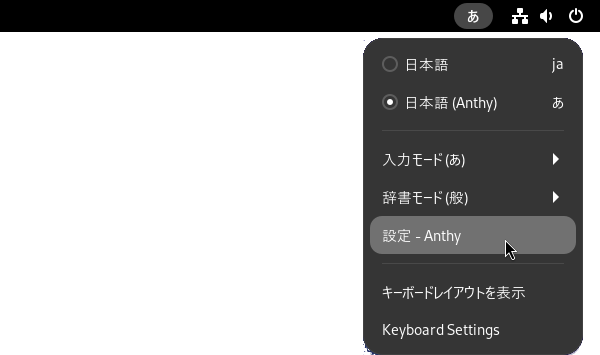
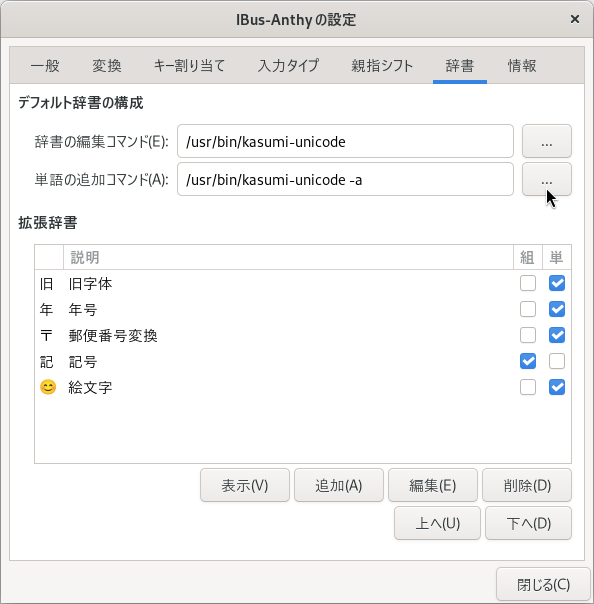
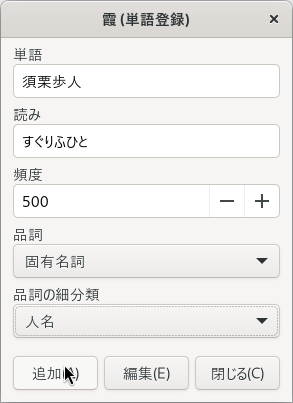
端末エミュレータから下記のように kasumi-unicode -a とタイプしても「霞 (単語登録)」のウィンドウを表示することができます。
端末エミュレータからコマンドで霞(かすみ)を起動
ちなみに kasumi-unicode コマンドのオプションは下記のようになっています。
bitwalk@fedora:~$ kasumi-unicode -h
Usage: kasumi [option]
Option:
  -h --help        Show this message.
  -v --version     Show Kasumi's version and copyright
                   information
  -m --manage      Run Kasumi in Manage mode.
                   You may abbreviate this option.
  -a --add         Run Kasumi in Add mode.
  -e --exclusive   Run Kasumi in Exclusive mode.
  --sound val      Set default sound entry (only in Add mode)
  --spelling val   Set default spelling entry (only in Add mode)
  --wordclass val  Set default word class entry (only in Add mode)
  -i --import      Import selected text as a spelling
  -I --ignore      Ignore selected text
  -E --eucjp       Use EUC-JP encoding for dictionary

bitwalk@fedora:~$