ラベル 機械学習 の投稿を表示しています。 すべての投稿を表示

2026-04-07

【備忘録】SB3 と TensorBoard

Stable Baselines3 (SB3) は、PyTorch をベースに実装した、信頼性の高い強化学習アルゴリズム(PPO, DQN, SAC 等)のオープンソースライブラリです。OpenAI Baselines の改良版で、統一された API により、数行のコードで環境の学習・評価・保存が容易に行えるため、研究やプロトタイピングの効率を大幅に向上できます。

強化学習モデルの学習中に、エピソード毎に解析したい情報を引き出す方法について Microsoft Copilot(以降、単に Copilot)に相談していたところ TensorBoard で可視化する話がでたので、突っ込んで聞いてみました。TensorBoard はその名前から TensorFlow の専用ツールだと勝手に思っていたのですが、全くの誤解でした。

「知らない」っていうのは怖いですね。TensorBoard を利用することで RL(強化学習)モデルの学習時の内部状態を(ほぼ)リアルタイムで確認できるようになりました。

TensorBoard について

Copilot が TensorBoard について下記のようにまとめてくれました。

  • 学習中の指標(episode reward, loss など)をグラフでリアルタイム可視化するツール
  • ブラウザで http://localhost:6006 を開いて眺めるスタイル
  • TensorBoard は TensorFlow 専用ではない
  • ログファイルを読み取るだけの汎用可視化サーバー
  • SB3 は標準で TensorBoard 出力に対応している
  • RL の “見えない内部状態” を可視化する最強ツール

TensorBoard の基本的な使い方

備忘録として、以前とりあげた倒立振子問題 (CartPole) [3] の学習を TensorBoard で可視化します。

動作環境は、パッケージのバージョンが更新されていることを除けば、倒立振子問題 (CartPole) の記事 [3] と同じですが、さらに TensorBoard をインストールします。

$ pip install tensorboard

TensorBoard を利用するには、モデル生成時、tensorboard_log に TensorBoard 用ログの出力ディレクトリ(存在していなくとも良い)を指定します。

model = PPO(
    "MlpPolicy",
    env,
    verbose=1,
    tensorboard_log="./ppo_cartpole_tensorboard/",
)

編集したプログラム cartpole_rl.py を起動して学習を始めた後に、別ターミナルで TensorBoard を起動します。その際に --logdir に、モデル生成時に指定したログの出力ディレクトリを指定します。

$ tensorboard --logdir ./ppo_cartpole_tensorboard/

ブラウザで http://localhost:6006 を開きます。

他の PC からアクセスする場合 [AlmaLinux 10]

LAN 内の他の PC のブラウザからアクセスをしたい場合は、TensorBoard のポート番号がファイアウォールを通るようにしておきます。

$ sudo firewall-cmd --add-port=6006/tcp --permanent
$ sudo firewall-cmd --reload

TensorBoard を起動する時に外部からアクセスできるように --bind_all を付けます。

$ tensorboard --logdir ./ppo_cartpole_tensorboard/ --bind_all

実行例

TensorBoard 用のログを出力できるようにしたプログラム cartpole_rl.py を起動します。

cartpole_rl.py の実行例
$ python cartpole_rl.py
Using cpu device
Wrapping the env in a DummyVecEnv.
Logging to ./ppo_cartpole_tensorboard/PPO_1
---------------------------------
| rollout/           |          |
|    ep_len_mean     | 20.3     |
|    ep_rew_mean     | 20.3     |
| time/              |          |
|    fps             | 46       |
|    iterations      | 1        |
|    time_elapsed    | 44       |
|    total_timesteps | 2048     |
---------------------------------
-----------------------------------------
| rollout/                |             |
|    ep_len_mean          | 26.4        |
|    ep_rew_mean          | 26.4        |
| time/                   |             |
|    fps                  | 46          |
|    iterations           | 2           |
|    time_elapsed         | 88          |
|    total_timesteps      | 4096        |
| train/                  |             |
|    approx_kl            | 0.008908875 |
|    clip_fraction        | 0.0802      |
|    clip_range           | 0.2         |
|    entropy_loss         | -0.686      |
|    explained_variance   | 0.000353    |
|    learning_rate        | 0.0003      |
|    loss                 | 6.18        |
|    n_updates            | 10          |
|    policy_gradient_loss | -0.0121     |
|    value_loss           | 45.3        |
-----------------------------------------
...
(以降省略)

別ターミナルで TensorBoard を起動します。

$ tensorboard --logdir ./ppo_cartpole_tensorboard/

Firefox を起動して http://localhost:6006 にアクセスします。

Firefox 上に表示した TensorBoard(例)

参考サイト

  1. Tensorboard Integration — Stable Baselines3 documentation
  2. tensorflow/tensorboard: TensorFlow's Visualization Toolkit
  3. bitWalk's: 倒立振子問題 (CartPole) [2025-10-03]


ブログランキング・にほんブログ村へ bitWalk's - にほんブログ村 にほんブログ村 IT技術ブログ オープンソースへ
にほんブログ村

オープンソース - ブログ村ハッシュタグ
#オープンソース


このエントリーをはてなブックマークに追加

2024-05-11

Prophet を使ってみた

Prophet は、R および Python 用に実装した時系列データの予測手法で、非線形のトレンドに年間、週間、日次の季節性、さらに休日効果をフィッティングする加法モデルに基づいています。強い季節効果と数シーズンの過去データを持つ時系列データの解析に最適です。Prophet は欠損値やトレンドのシフトに対してロバストで、一般的に外れ値に対してもうまく対処できます。

Prophet は Facebook の Core Data Science チームによってリリースされたオープンソースのソフトウェアです。CRAN と PyPI からダウンロード可能です。

Prophet のプロジェクトサイトより引用、翻訳・編集

最近、思っているような時系列解析ができずに苦しんでいます。あれこれ試している中で、Python の statsmodels パッケージの Unobserved components models [1] を試した結果を本ブログでまとめましたが [2]、今回は Prophet を試してみました。

下記の OS 環境で動作確認をしています。

Fedora Workstation 40 x86_64
Python 3.12.2
jupyterlab 4.1.8
matplotlib 3.8.4
pandas 2.2.2
prophet 1.1.5
statsmodels 0.14.2

statsmodels パッケージは、今回はデータセットを利用するためだけに必要になります。

今回の解析は JupyterLab を使用しています。

必要なライブラリーの読み込み

最初に、必要なライブラリーを読み込んでおきます。

import matplotlib.pyplot as plt
import pandas as pd
from prophet import Prophet
 
import statsmodels.datasets.co2 as co2

データセット

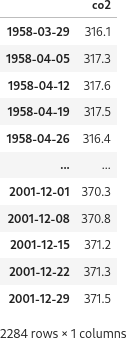
今回も過去記事 [2] と同じ、statsmodels に用意されている CO2 濃度のデータセットを利用します。

co2_raw = co2.load().data
co2_raw


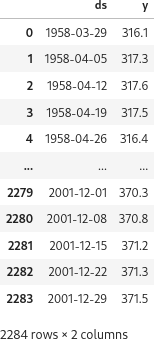
Prophet へ入力するには、ds(datestamp = 時刻情報)カラムと y カラムにデータフレームを整形する必要があります。y は予測したい測定値です。今回は次のようにしました。

df = co2_raw.reset_index()
df.columns=['ds', 'y']
df


過去記事 [2] では、欠損値の少ない期間を選んで、月平均を算出して、そのデータを使用しましたが、今回は欠損値を気にせず、すべてのデータを使います。

モデルの作成と学習

モデルを作成して、用意したデータフレームで学習します。

model = Prophet()
model.fit(df)

予測

過去記事 [2] と同じ期間の予測をしてみます。モデルの make_future_dataframe メソッドで期間(日)を指定して予測用のデータフレームを作成します。

future = model.make_future_dataframe(periods=365 * 4 + 3)
future.tail()


モデルの predict メソッドで予測します。

forecast = model.predict(future)
forecast[['ds', 'yhat', 'yhat_lower', 'yhat_upper']].tail()


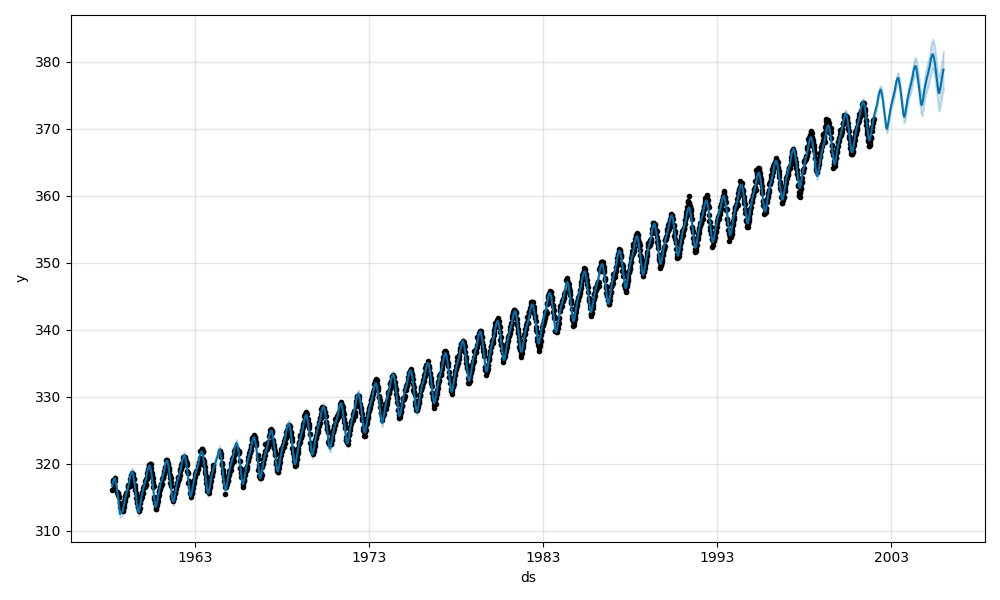
予測結果をプロットします。

fig1 = model.plot(forecast)
# plt.savefig('trend_analysis_11/fig-001.png')


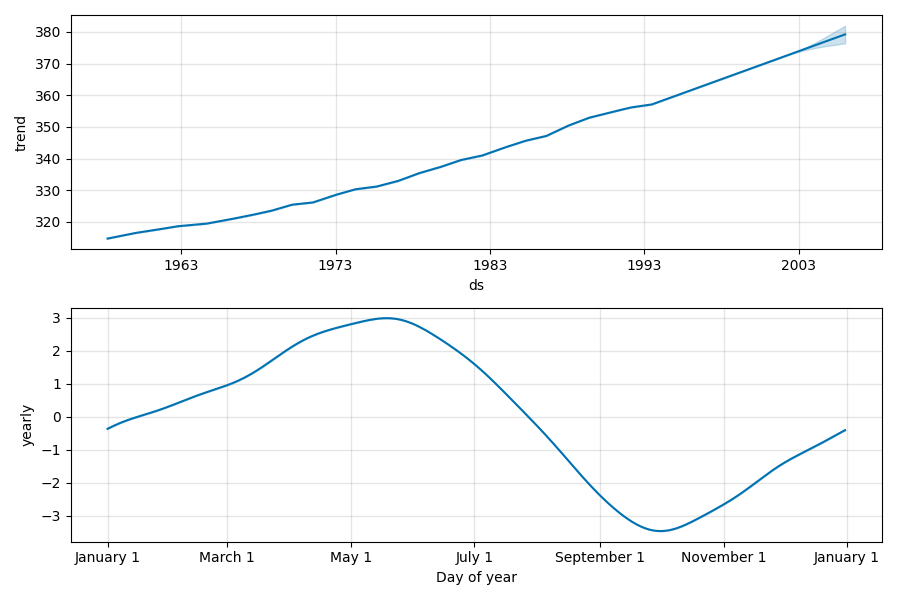
plot_components メソッドで成分を確認できます。

fig2 = model.plot_components(forecast)
# plt.savefig('trend_analysis_11/fig-002.png')


今回の解析では、トレンド成分と月別の成分がプロットされましたが、Prophet ではカレンダー情報を持っているようで、もし曜日依存するようであれば、曜日毎のプロットも表示されます。

まとめ

Prophet の基本的な使い方は scikit-learn のモデルと同じで、個人的には使いやすいと感じました。なにより欠損値に強く、周期変動を指定しなくとも解析してくれるのが嬉しいです。ただ、まだ全然使い込んでいません。まずは具体的なデータ解析を通じて使いこなせるようにしたいです。

参考サイト

  1. statsmodels.tsa.statespace.structural.UnobservedComponents - statsmodels
  2. bitWalk's: 【備忘録】Unobserved components モデル [2024-05-06]
  3. Prophet | Forecasting at scale.
  4. Prophetを使ってサクッと時系列データ予測をやる #Python - Qiita [2023-04-08]
  5. 将来予測で用いられるライブラリ「Prophet」 | スキルアップAI Journal [2023-06-13]
  6. Prophetによる時系列データ予測: Analyst-in-the-Loop [2024-01-04]
  7. 【Python 入門】Prophet を使った時系列データ分析と Plotly による可視化! | キカガクブログ [2024-04-15]


ブログランキング・にほんブログ村へ bitWalk's - にほんブログ村 にほんブログ村 IT技術ブログ オープンソースへ
にほんブログ村

オープンソース - ブログ村ハッシュタグ
#オープンソース


このエントリーをはてなブックマークに追加

2023-06-13

【備忘録】Python/Scikit-learn の PLS を使う (2)

PLS 回帰, Partial Least Squares Regression(部分的最小二乗回帰)とは、目的変数 Y を予測するために係数を最適化する手法のひとつです。前回は、R で動作確認した PLS 回帰の使い方を、少し形を変えて Python と Scikit-Learn でも確認しましたが [1]、今回は参考サイト [2] で紹介されている方法で、PLS 回帰における変数選択の重要性について確認しました。

下記の OS 環境で動作確認をしています。

Fedora Linux 38 x86_64
Python 3.11.3
JupyterLab 4.0.2
scikit-learn 1.2.2
matplotlib 3.7.1

本記事は参考サイト [2] に従って、別のサンプルで動作結果をして、それを備忘録にすることが目的なので、統計的解釈に深くは立ち入っていないことをご了承下さい。また、あとで得た知見で書き直したり書き足したりすることもあります。

データセット

前回の PLS の記事 [1] で使ったデータセットの gasoline データを利用しました(下記のサイト)。

具体的には以下のファイルを利用します(本記事で使用するのは gasoline.csv のみです)。

  • gasoline.csv
  • octane.xlsx

また、上記のリポジトリにあるサンプルプログラム plsr_example.py には、読み込んだファイルを整理してデータセットとして扱いやすいように編集してくれる関数がありましたので、少し修正したものを利用しています。

plsr_example.py より引用、修正
import numpy as np
import pandas as pd

def import_dataset(ds_name='octane'):
    """
    ds_name: Name of the dataset ('octane', 'gasoline')
    Returns:
    wls: Numpy ndarray: List of wavelength
    xdata: Pandas DataFrame: Measurements
    ydata: Pandas Series: Octane numbers
    """

    if ds_name == 'octane':
        oct_df = pd.read_excel('octane.xlsx')
        wls = np.array([int(i) for i in oct_df.columns.values[2:]])
        xdata = oct_df.loc[:, '1100':]
        ydata = oct_df['Octane number']
    elif ds_name == 'gasoline':
        import re

        gas_df = pd.read_csv('gasoline.csv')
        reg = re.compile('([0-9]+)')
        wls = np.array([int(reg.findall(i)[0]) for i in gas_df.columns.values[1:]])
        xdata = gas_df.loc[:, 'NIR.900 nm':]
        ydata = gas_df['octane']
    else:
        exit('Invalid Dataset')

    return wls, xdata, ydata

利用できるデータセットは二種類ありますが、ここでは gasoline を指定してデータを取得します。

dataset = 'gasoline'
#dataset = 'octane'
wls, xdata, ydata = import_dataset(dataset)

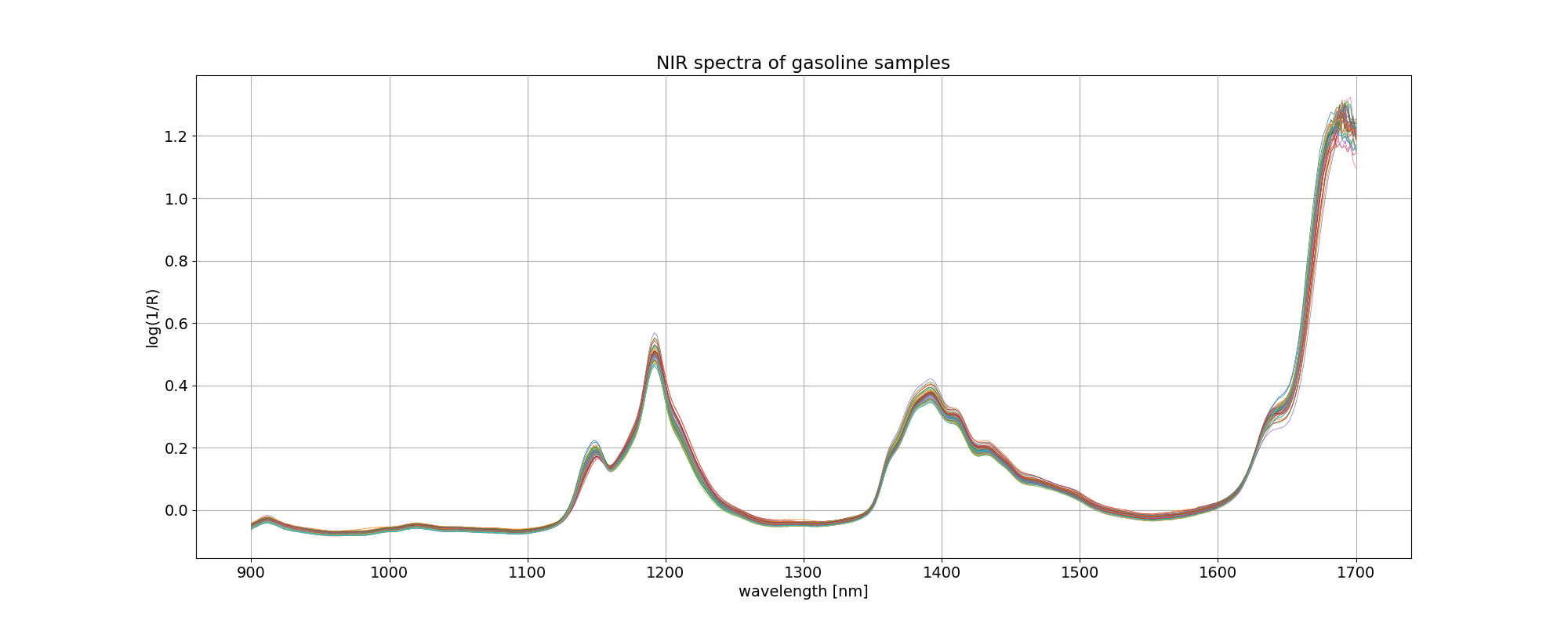
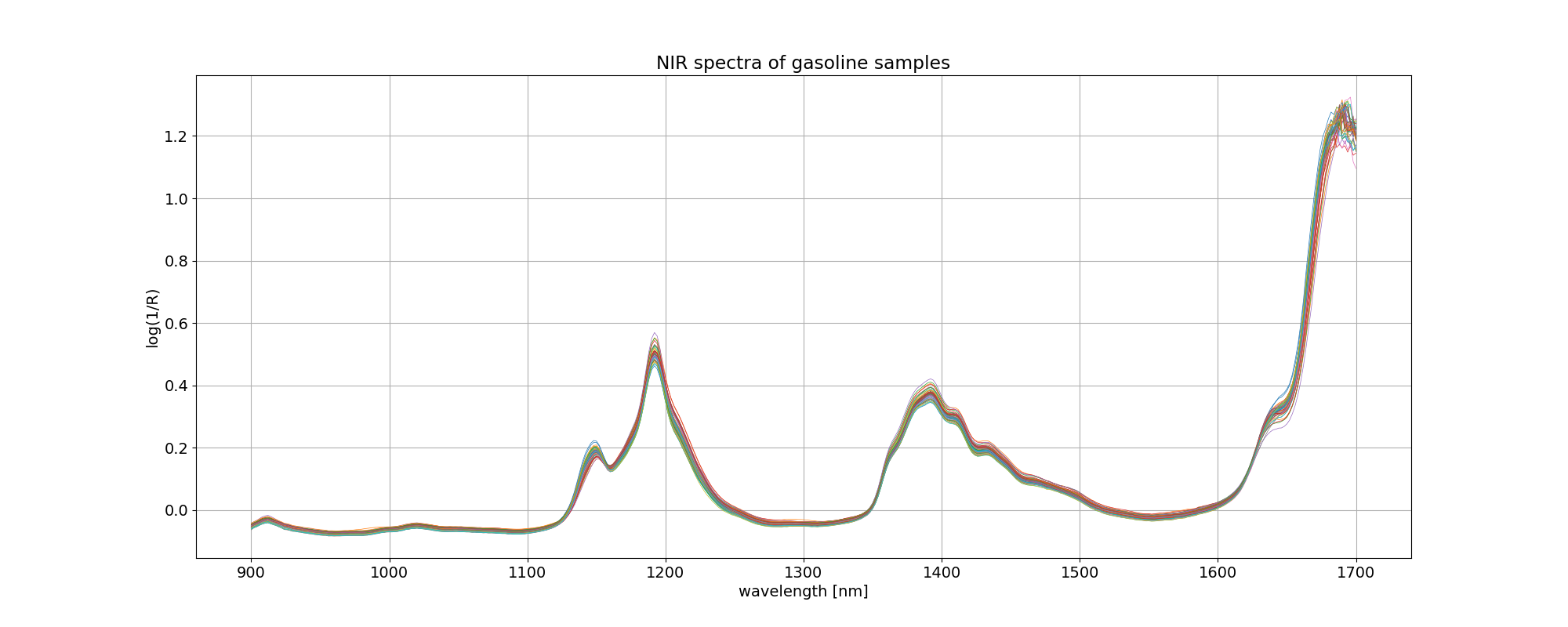
イメージしやすいように、読み込んだ gasoline データについて、波長を横軸にとってプロットしました。凡例を付けませんでしたが、線の色はオクタン価の違いを表しています。

import matplotlib.pyplot as plt
plt.rcParams['font.size'] = 14

fig, ax = plt.subplots(figsize=(20, 8))
ax.plot(wls, xdata.values.T, linewidth=0.5)
ax.set_title('NIR spectra of %s samples' % dataset)
ax.set_xlabel('wavelength [nm]')
ax.set_ylabel('log(1/R)')

plt.grid()
plt.savefig('octane_101.png')
plt.show()


最適モデルの探索 2

このデータ解析の目的は、

octane = f(NIR) = f(NIRwavelength1, NIRwavelength2, ...)

という関数関係を求めて、スペクトルからオクタン価を予測することなのですが、401 個の変数(NIR スペクトル、波長)、60 組のデータでは、従来の重回帰分析を使おうとしても自由度が全然足りなくて解析できません。しかし、401 個のデータは互いに独立した関係にはありません。そこで PLS 回帰を用いて、これら NIR スペクトルから互いに無相関な新しい説明変数(潜在変数)を抽出して、重要度(標準回帰係数)の高い潜在変数から順番に適用して関数関係を求めます。

octane = g(compwavelength1, compwavelength2, ...)

前回 [1] は、成分数を変えて PLS 回帰を実行して、予実の MSE(平均二乗誤差)が最小になる成分数を見つけるというアプローチでした。

今回は 成分数の探索に加えて、401 個の変数(NIR スペクトル、波長)から、オクタン価の予測に寄与する(= MSE を最小にする)変数の組み合わせを選択するというアプローチを取ります。評価基準はクロスバリデーションをした上で MSE が最初になる変数の組み合わせを選ぶことになります。

まず、データをトレーニング用とテスト用の二つに分けます。分ける比率は前回 [1] と揃えました。

from sklearn.model_selection import train_test_split

X_train, X_test, y_train, y_test = train_test_split(xdata, ydata, test_size=0.16, shuffle=False)

X_train, y_train のデータセットを使って、前回と同じように MSE が最小となるように PLS 回帰の成分数を変動させます。そのループの中で、さらに寄与度の低い変数(NIR スペクトル、波長)から一つずつ抜いて PLS 回帰を実行、クロスバリデーションをして MSE を評価します。

なお、計算時間を少しでも減らしたかったので、とりあえず PLS 回帰の最大の成分数を、元の変数の数の1割としました。最適な成分数がこの最大値と同じになるような場合は、この最大値を増やします。

from sys import stdout
import warnings

from sklearn.cross_decomposition import PLSRegression
from sklearn.model_selection import cross_val_predict
from sklearn.metrics import mean_squared_error

warnings.simplefilter("ignore")

X = X_train.values
y = y_train
max_comp = int(X.shape[1] / 10)

# Define MSE array to be populated
mse = np.zeros((max_comp, X.shape[1]))

# Loop over the number of PLS components
for i in range(max_comp):
    
    # Regression with specified number of components, using full spectrum
    pls1 = PLSRegression(n_components=i + 1)
    pls1.fit(X, y)
    
    # Indices of sort spectra according to ascending absolute value of PLS coefficients
    # sorted_ind = np.argsort(np.abs(pls1.coef_[:, 0]))
    sorted_ind = np.argsort(np.abs(pls1.coef_[0]))

    # Sort spectra accordingly 
    Xc = X[:, sorted_ind]

    # Discard one wavelength at a time of the sorted spectra,
    # regress, and calculate the MSE cross-validation
    for j in range(Xc.shape[1] - (i + 1)):

        pls2 = PLSRegression(n_components=i + 1)
        pls2.fit(Xc[:, j:], y)
        
        y_cv = cross_val_predict(pls2, Xc[:, j:], y, cv=5)

        mse[i, j] = mean_squared_error(y, y_cv)

    comp = 100 * (i + 1) / (max_comp)
    stdout.write('\r%d%% completed' % comp)
    stdout.flush()

stdout.write('\n')

# Calculate and print the position of minimum in MSE
mseminx, mseminy = np.where(mse==np.min(mse[np.nonzero(mse)]))

print('Optimised number of PLS components:', mseminx[0] + 1)
print('Wavelengths to be discarded', mseminy[0])
print('Optimised MSEP', mse[mseminx, mseminy][0])
stdout.write('\n')
100% completed
Optimised number of PLS components: 27
Wavelengths to be discarded 300
Optimised MSEP 0.02052183734296931

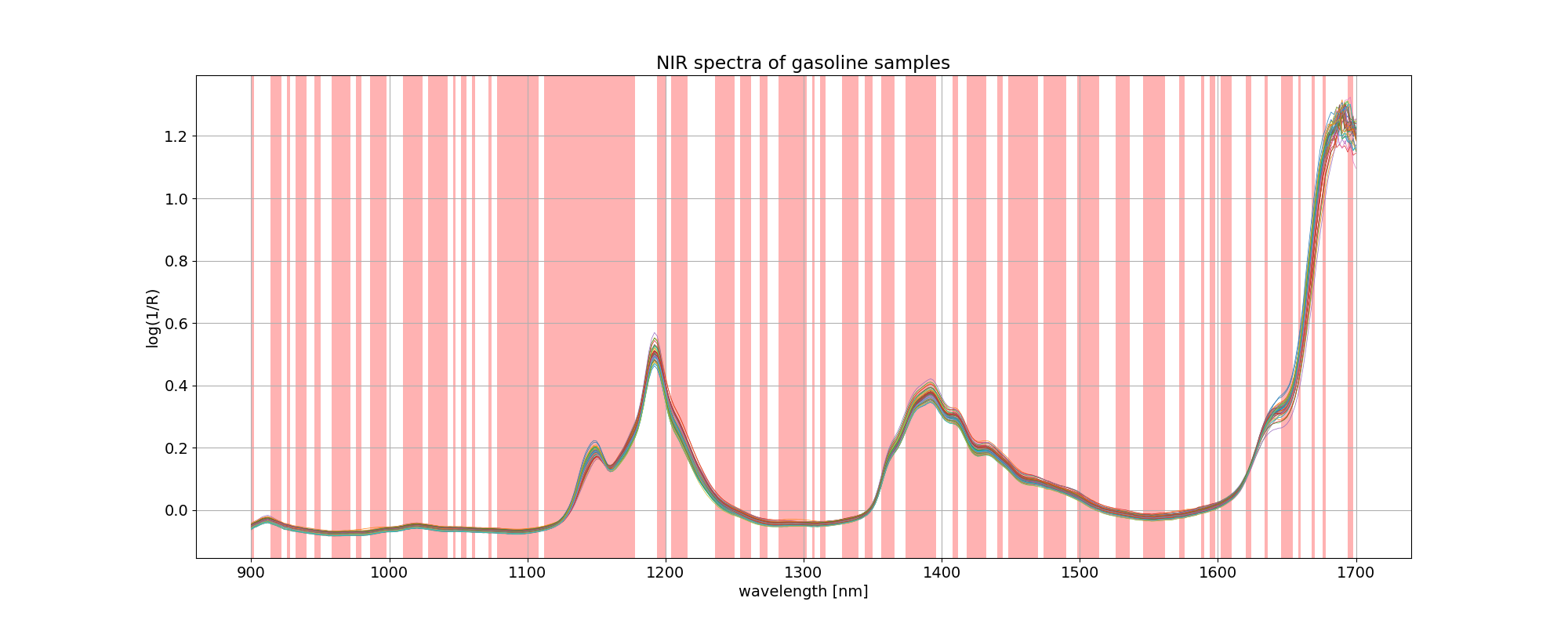
計算の結果、PLS 回帰の最適な成分数は 27、破棄される波長数は 300 となりました。

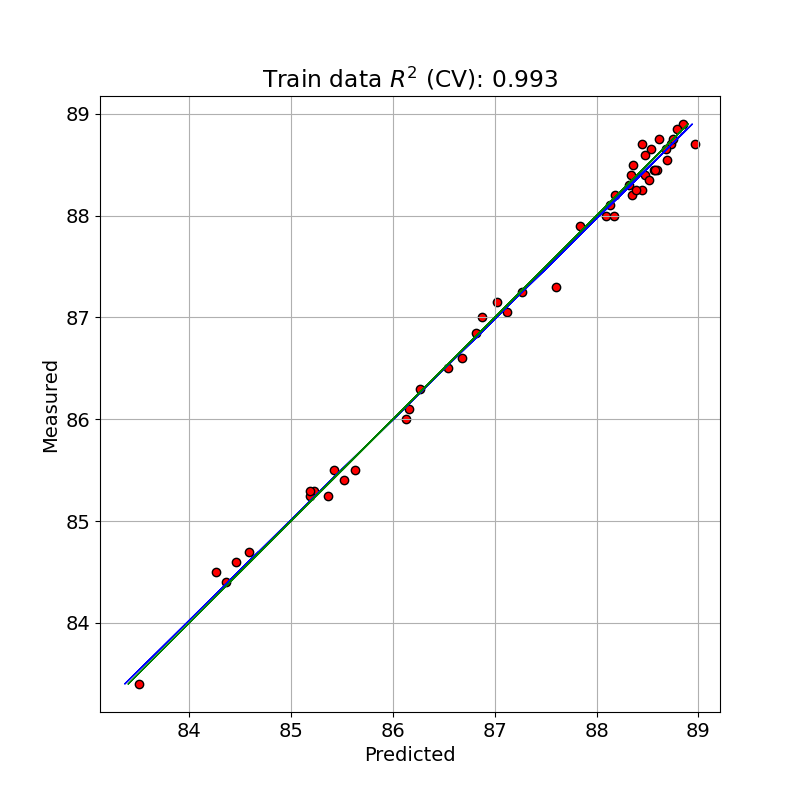
この最適な PLS モデルでトレーニングデータを予測(クロスバリデーションと比較)した値と測定値とを単回帰したプロットを示しました。

from sklearn.metrics import r2_score

X = X_train.values
y = y_train

# Calculate PLS with optimal components and export values
pls = PLSRegression(n_components=mseminx[0] + 1)
pls.fit(X, y)

# sorted_ind = np.argsort(np.abs(pls.coef_[:, 0]))
sorted_ind = np.argsort(np.abs(pls.coef_[0]))

Xc = X[:, sorted_ind]
opt_Xc = Xc[:, mseminy[0]:]

n_comp = mseminx[0] + 1
wav = mseminy[0]

pls = PLSRegression(n_components=n_comp)

pls.fit(opt_Xc, y)
y_c = pls.predict(opt_Xc)

# Cross-validation
y_cv = cross_val_predict(pls, opt_Xc, y, cv=10)    

# Calculate scores for calibration and cross-validation
score_c = r2_score(y, y_c)
score_cv = r2_score(y, y_cv)

# Calculate mean square error for calibration and cross validation
mse_c = mean_squared_error(y, y_c)
mse_cv = mean_squared_error(y, y_cv)

print('R2 calib: %5.3f'  % score_c)
print('R2 CV: %5.3f'  % score_cv)
print('MSE calib: %5.3f' % mse_c)
print('MSE CV: %5.3f' % mse_cv)

# Plot regression
z = np.polyfit(y, y_cv, 1)

fig, ax = plt.subplots(figsize=(8, 8))
ax.scatter(y_cv, y, c='red', edgecolors='k')
ax.plot(z[1] + z[0] * y, y, c='blue', linewidth=1)
ax.plot(y, y, color='green', linewidth=1)
ax.axis('equal')
plt.title('Train data $R^{2}$ (CV): %5.3f' % score_cv)
plt.xlabel('Predicted')
plt.ylabel('Measured')
plt.grid()

plt.savefig('octane_111.png')
plt.show()
R2 calib: 1.000
R2 CV: 0.993
MSE calib: 0.000
MSE CV: 0.016


クロスバリデーションをした予測で決定係数が 0.993 となっており、前回よりさらによくフィッティングできています。クロスバリデーションをしない MSE calib が 0.000( R2 =1.000)になっているのは、ちょっとできすぎの感があります。

変数選択の結果、使用しなかった(discarded: 破棄した)波長に色を付けると以下のようになります。

# Get a boolean array according to the indices that are being discarded
ix = np.in1d(wls.ravel(), wls[sorted_ind][:wav])
 
import matplotlib.collections as collections
 
# Plot spectra with superimpose selected bands
fig, ax = plt.subplots(figsize=(20, 8))
ax.plot(wls, xdata.values.T, linewidth=0.5)
ax.set_title('NIR spectra of %s samples' % dataset)
ax.set_xlabel('wavelength [nm]')
ax.set_ylabel('log(1/R)')

collection = collections.BrokenBarHCollection.span_where(
    wls,
    ymin=-1,
    ymax=max(xdata.T),
    where=ix==True,
    facecolor='red',
    alpha=0.3
)
ax.add_collection(collection)
plt.grid()

plt.savefig('octane_112.png')
plt.show()


テストデータで予測

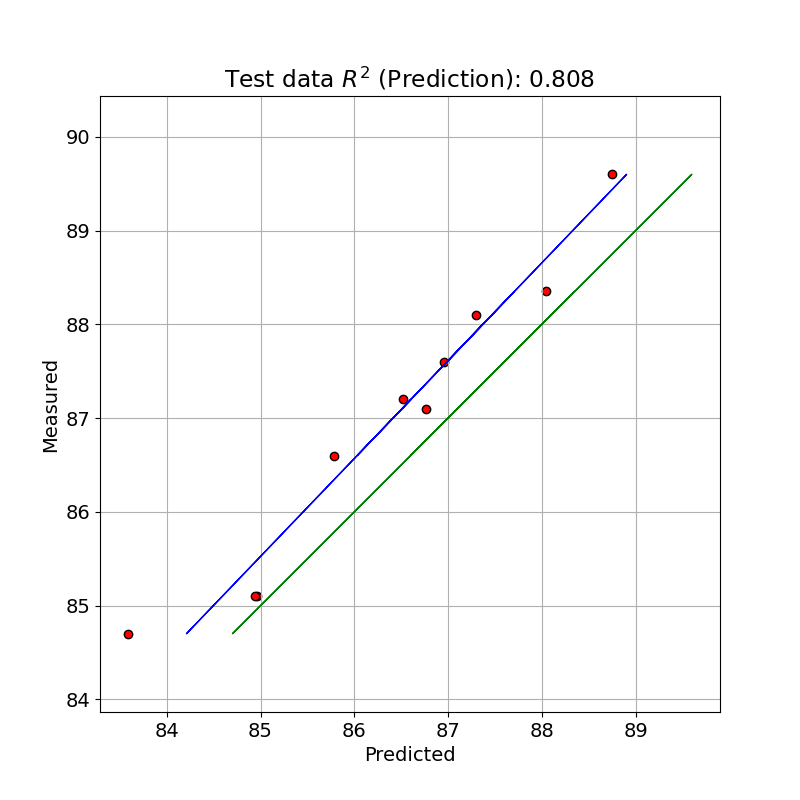
テストデータで PLS のモデルで予測した値と測定値とを単回帰したプロットを示しました。

X = X_test.values
y = y_test

X_test_2 = X[:, sorted_ind]
opt_X_test = X_test_2[:, mseminy[0]:]

# pls.fit(opt_X_test, y)
y_pred = pls.predict(opt_X_test)

# Calculate scores for calibration
score_pred = r2_score(y, y_pred)

# Calculate mean square error for calibration
mse_pred = mean_squared_error(y, y_pred)

print('R2 pred: %5.3f'  % score_pred)
print('MSE pred: %5.3f' % mse_pred)

# Plot regression 
z = np.polyfit(y, y_pred, 1)

fig, ax = plt.subplots(figsize=(8, 8))
ax.scatter(y_pred, y, c='red', edgecolors='k')
ax.plot(z[1] + z[0] * y, y, c='blue', linewidth=1)
ax.plot(y, y, color='green', linewidth=1)
ax.axis('equal')
plt.title('Test data $R^{2}$ (Prediction): %.3f' % score_pred)
plt.xlabel('Predicted')
plt.ylabel('Measured')
plt.grid()

plt.savefig('octane_113.png')
plt.show()
R2 pred: 0.808
MSE pred: 0.439


テストデータでは、今回はあまり良いパフォーマンスを得られませんでした。

※ テストデータの評価に間違いがありましたので修正しました。[2023-07-07]

参考サイト

  1. bitWalk's: 【備忘録】Python/Scikit-learn の PLS を使う [2023-05-27]
  2. A variable selection method for PLS in Python [2018-07-04]


ブログランキング・にほんブログ村へ bitWalk's - にほんブログ村 にほんブログ村 IT技術ブログ オープンソースへ
にほんブログ村

オープンソース - ブログ村ハッシュタグ
#オープンソース


このエントリーをはてなブックマークに追加

2023-05-27

【備忘録】Python/Scikit-learn の PLS を使う

PLS 回帰, Partial Least Squares Regression(部分的最小二乗回帰)とは、目的変数 Y を予測するために係数を最適化する手法のひとつです。以前、R の pls パッケージを使い方をまとめましたので [1]、python / scikit-learn でも同じように PLS を扱ってみます。

下記の OS 環境で動作確認をしています。

Fedora Linux 38 x86_64
Python 3.11.3
JupyterLab 4.0.0
scikit-learn 1.2.2
matplotlib 3.7.1

ここでは、サイト [2] で紹介されている方法を別のデータセットで確認しています。本記事はその動作結果を備忘録にすることが目的なので、統計的解釈に深くは立ち入っていないことをご了承下さい。また、あとで得た知見で書き直したり書き足したりすることもあります。

データセット

以前 R の pls パッケージの使い方の紹介 [1] で使ったデータセットと同じ gasoline データは、下記のサイトで公開されていましたので、利用させていただきました。

具体的には以下のファイルを利用します(本記事で使用するのは gasoline.csv のみです)。

  • gasoline.csv
  • octane.xlsx

また、上記のリポジトリにあるサンプルプログラム plsr_example.py には、読み込んだファイルを整理してデータセットとして扱いやすいように編集してくれる関数がありましたので、少し修正して利用しています。

plsr_example.py より引用、修正
import numpy as np
import pandas as pd

def import_dataset(ds_name='octane'):
    """
    ds_name: Name of the dataset ('octane', 'gasoline')
    Returns:
    wls: Numpy ndarray: List of wavelength
    xdata: Pandas DataFrame: Measurements
    ydata: Pandas Series: Octane numbers
    """

    if ds_name == 'octane':
        oct_df = pd.read_excel('octane.xlsx')
        wls = np.array([int(i) for i in oct_df.columns.values[2:]])
        xdata = oct_df.loc[:, '1100':]
        ydata = oct_df['Octane number']
    elif ds_name == 'gasoline':
        import re

        gas_df = pd.read_csv('gasoline.csv')
        reg = re.compile('([0-9]+)')
        wls = np.array([int(reg.findall(i)[0]) for i in gas_df.columns.values[1:]])
        xdata = gas_df.loc[:, 'NIR.900 nm':]
        ydata = gas_df['octane']
    else:
        exit('Invalid Dataset')

    return wls, xdata, ydata

利用できるデータセットは二種類ありますが、ここでは gasoline を指定してデータを取得します。

dataset = 'gasoline'
#dataset = 'octane'
wls, xdata, ydata = import_dataset(dataset)

取得した wls, xdata, ydata それぞれの内容を確認します。

まず、波長 (wls) です。

print(len(wls))
wls
401
array([ 900,  902,  904,  906,  908,  910,  912,  914,  916,  918,  920,
        922,  924,  926,  928,  930,  932,  934,  936,  938,  940,  942,
        944,  946,  948,  950,  952,  954,  956,  958,  960,  962,  964,
        966,  968,  970,  972,  974,  976,  978,  980,  982,  984,  986,
        988,  990,  992,  994,  996,  998, 1000, 1002, 1004, 1006, 1008,
       1010, 1012, 1014, 1016, 1018, 1020, 1022, 1024, 1026, 1028, 1030,
       1032, 1034, 1036, 1038, 1040, 1042, 1044, 1046, 1048, 1050, 1052,
       1054, 1056, 1058, 1060, 1062, 1064, 1066, 1068, 1070, 1072, 1074,
       1076, 1078, 1080, 1082, 1084, 1086, 1088, 1090, 1092, 1094, 1096,
       1098, 1100, 1102, 1104, 1106, 1108, 1110, 1112, 1114, 1116, 1118,
       1120, 1122, 1124, 1126, 1128, 1130, 1132, 1134, 1136, 1138, 1140,
       1142, 1144, 1146, 1148, 1150, 1152, 1154, 1156, 1158, 1160, 1162,
       1164, 1166, 1168, 1170, 1172, 1174, 1176, 1178, 1180, 1182, 1184,
       1186, 1188, 1190, 1192, 1194, 1196, 1198, 1200, 1202, 1204, 1206,
       1208, 1210, 1212, 1214, 1216, 1218, 1220, 1222, 1224, 1226, 1228,
       1230, 1232, 1234, 1236, 1238, 1240, 1242, 1244, 1246, 1248, 1250,
       1252, 1254, 1256, 1258, 1260, 1262, 1264, 1266, 1268, 1270, 1272,
       1274, 1276, 1278, 1280, 1282, 1284, 1286, 1288, 1290, 1292, 1294,
       1296, 1298, 1300, 1302, 1304, 1306, 1308, 1310, 1312, 1314, 1316,
       1318, 1320, 1322, 1324, 1326, 1328, 1330, 1332, 1334, 1336, 1338,
       1340, 1342, 1344, 1346, 1348, 1350, 1352, 1354, 1356, 1358, 1360,
       1362, 1364, 1366, 1368, 1370, 1372, 1374, 1376, 1378, 1380, 1382,
       1384, 1386, 1388, 1390, 1392, 1394, 1396, 1398, 1400, 1402, 1404,
       1406, 1408, 1410, 1412, 1414, 1416, 1418, 1420, 1422, 1424, 1426,
       1428, 1430, 1432, 1434, 1436, 1438, 1440, 1442, 1444, 1446, 1448,
       1450, 1452, 1454, 1456, 1458, 1460, 1462, 1464, 1466, 1468, 1470,
       1472, 1474, 1476, 1478, 1480, 1482, 1484, 1486, 1488, 1490, 1492,
       1494, 1496, 1498, 1500, 1502, 1504, 1506, 1508, 1510, 1512, 1514,
       1516, 1518, 1520, 1522, 1524, 1526, 1528, 1530, 1532, 1534, 1536,
       1538, 1540, 1542, 1544, 1546, 1548, 1550, 1552, 1554, 1556, 1558,
       1560, 1562, 1564, 1566, 1568, 1570, 1572, 1574, 1576, 1578, 1580,
       1582, 1584, 1586, 1588, 1590, 1592, 1594, 1596, 1598, 1600, 1602,
       1604, 1606, 1608, 1610, 1612, 1614, 1616, 1618, 1620, 1622, 1624,
       1626, 1628, 1630, 1632, 1634, 1636, 1638, 1640, 1642, 1644, 1646,
       1648, 1650, 1652, 1654, 1656, 1658, 1660, 1662, 1664, 1666, 1668,
       1670, 1672, 1674, 1676, 1678, 1680, 1682, 1684, 1686, 1688, 1690,
       1692, 1694, 1696, 1698, 1700])

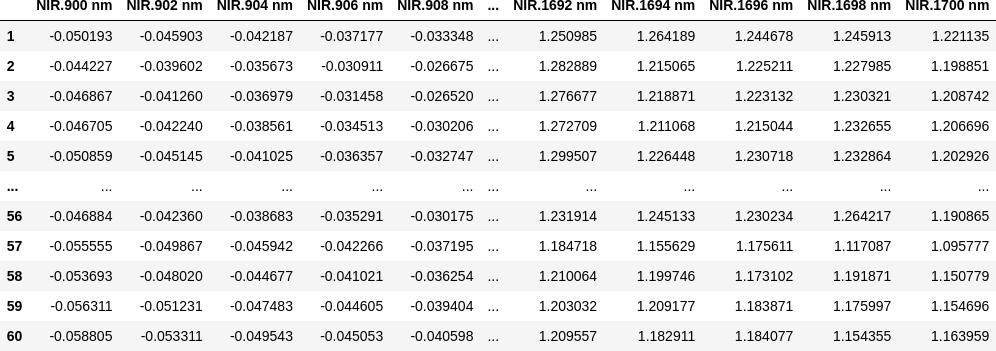
つぎは、NIR スペクトルのデータ (xdata) です。

import dataframe_image as dfi

print(xdata.shape)
dfi.export(xdata, 'octane_table_001.png', max_cols=10, max_rows=10,)
xdata
(60, 401)
60 rows × 401 columns

そして、対応するオクタン価のデータ (ydata) です。

print(ydata.shape)
ydata.head()
(60,)
1    85.30
2    85.25
3    88.45
4    83.40
5    87.90
Name: octane, dtype: float64

イメージしやすいように、gasoline データについて、波長を横軸にとってプロットしてみました。凡例を付けませんでしたが、線の色はオクタン価の違いを表しています。

import matplotlib.pyplot as plt
plt.rcParams['font.size'] = 14

fig, ax = plt.subplots(figsize=(20, 8))
ax.plot(wls, xdata.values.T, linewidth=0.5)
ax.set_title('NIR spectra of %s samples' % dataset)
ax.set_xlabel('wavelength [nm]')
ax.set_ylabel('log(1/R)')

plt.grid()
plt.savefig('octane_001.png')
plt.show()


最適モデルの探索

このデータ解析の目的は、

octane = f(NIR) = f(NIRwavelength1, NIRwavelength2, ...)

という関数関係を求めて、スペクトルからオクタン価を予測することなのですが、401 個の変数(NIR スペクトル)、60 組のデータでは、従来の重回帰分析を使おうとしても自由度が全然足りなくて解析できません。しかし、401 個のデータは互いに独立した関係にはありません。そこで PLS 回帰を用いて、これら NIR スペクトルから互いに無相関な新しい説明変数(潜在変数)を抽出して、重要度(標準回帰係数)の高い潜在変数から順番に適用して関数関係を求めます。

octane = g(compwavelength1, compwavelength2, ...)

まず、データをトレーニング用とテスト用の二つに分けます。分ける比率は、以前 R の pls パッケージの使い方を紹介 [1] した時と同じにしました。

from sklearn.model_selection import train_test_split

X_train, X_test, y_train, y_test = train_test_split(xdata, ydata, test_size=0.16, shuffle=False)

X_train, y_train のデータセットを使って、成分 (component) の数を変えて PLS 回帰を実行します。ここでは、元の波長成分 401 の 10% の 40 まで成分数を変えてループしています。

各成分数で PLS 回帰を実行したら 10 回のクロスバリデーションして、予実の MSE(平均二乗誤差)を記録しておき、この中から MSE が最小になる成分数を見つけます。

from sklearn.cross_decomposition import PLSRegression
from sklearn.model_selection import cross_val_predict
from sklearn.metrics import mean_squared_error

list_mse = []
n_comp = int(xdata.shape[1] / 10)
component = np.arange(1, n_comp + 1)
    
for i in component:
    pls = PLSRegression(n_components=i)

    # Cross-validation
    y_cv = cross_val_predict(pls, X_train, y_train, cv=10)
    # Root Mean Square Error of Precision
    mse = mean_squared_error(y_train, y_cv, squared=True)
    list_mse.append(mse)

# Calculate and print the position of minimum in MSE
mse_min = np.argmin(list_mse)
print('Suggested number of components: ', mse_min + 1)
Suggested number of components:  4

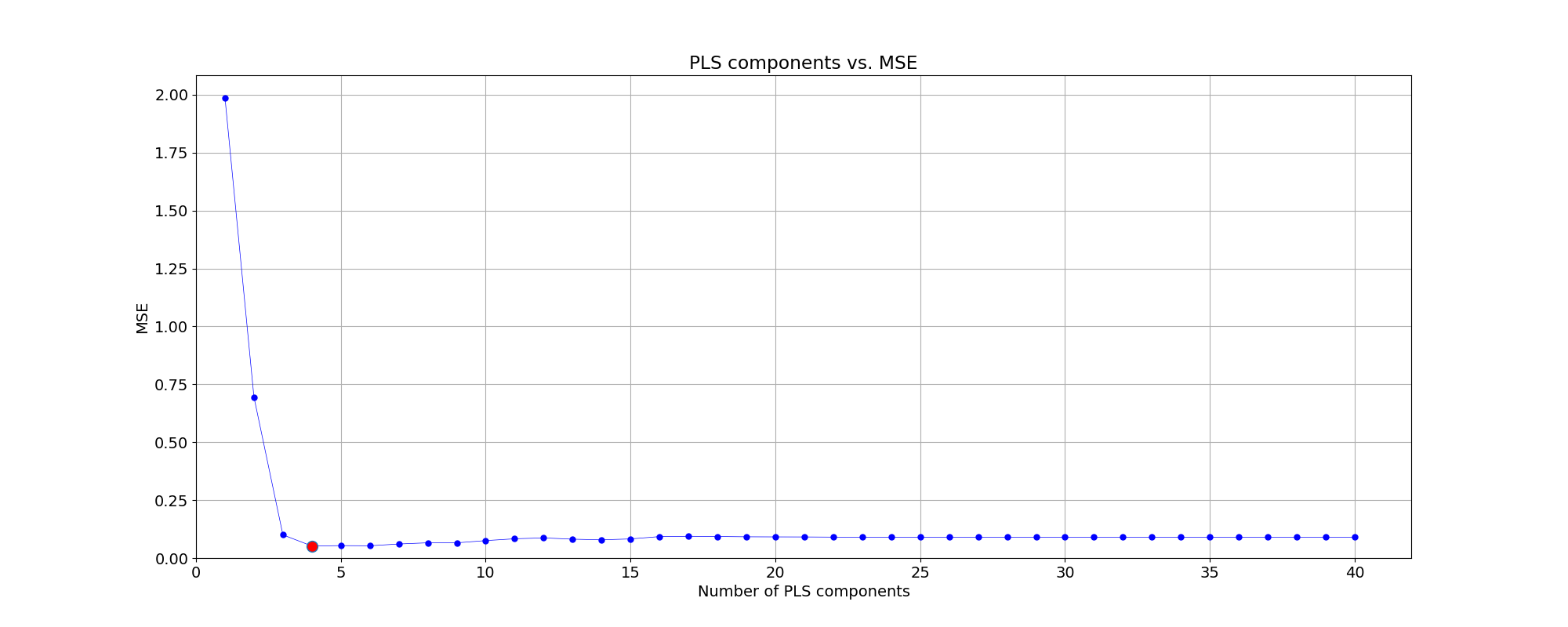
計算の結果、MSE が最小となる成分数は 4 となりました。成分数と MSE の関係をプロットにしました。

fig, ax = plt.subplots(figsize=(20, 8))

plt.plot(component, np.array(list_mse), '-o', ms=5, color = 'blue', mfc='blue', linewidth=0.5)
plt.plot(component[mse_min], np.array(list_mse)[mse_min], 'o', ms=10, mfc='red')
plt.xlabel('Number of PLS components')
plt.ylabel('MSE')
plt.title('PLS components vs. MSE')
plt.xlim(left=0)
plt.ylim(bottom=0)
#ax.xaxis.set_ticks(np.arange(0, n_comp, 1))
plt.grid()

plt.savefig('octane_002.png')
plt.show()


MSE が最小となる成分数 4 について、そのまま PLS モデルで予測した時と、10 回のクロスバリデーションをかけたときの予測パフォーマンスを比べました。

from sklearn.metrics import r2_score

# Define PLS object with optimal number of components
pls_opt = PLSRegression(n_components=mse_min + 1)

# Fit to the entire dataset
# pls_opt.fit(X_train, y_train)
y_train_c = pls_opt.predict(X_train)

# Cross-validation
y_train_cv = cross_val_predict(pls_opt, X_train, y_train, cv=10)

# Calculate scores for calibration and cross-validation
score_train_c = r2_score(y_train, y_train_c)
score_train_cv = r2_score(y_train, y_train_cv)

# Calculate mean squared error for calibration and cross validation
mse_train_c = mean_squared_error(y_train, y_train_c)
mse_train_cv = mean_squared_error(y_train, y_train_cv)

print('for Training data')
print('R2 calib: %5.3f' % score_train_c)
print('R2 CV: %5.3f' % score_train_cv)
print('MSE calib: %5.3f' % mse_train_c)
print('MSE CV: %5.3f' % mse_train_cv)
for Training data
R2 calib: 0.985
R2 CV: 0.977
MSE calib: 0.035
MSE CV: 0.052

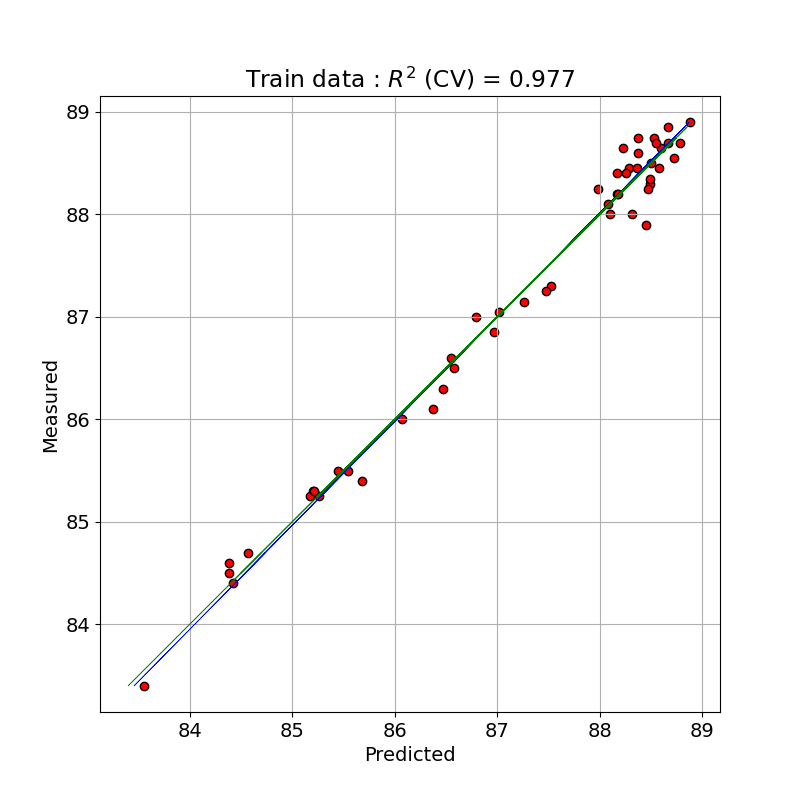
トレーニングデータで PLS のモデルで予測(クロスバリデーションと比較)した値と測定値とを単回帰したプロットを示しました。クロスバリデーションをした予測で決定係数が 0.977 となっており、よくフィッティングできています。

# Plot regression and figures of merit
rangey = max(y_train) - min(y_train)
rangex = max(y_train_c) - min(y_train_c)

# Fit a line to the CV vs response
z = np.polyfit(y_train, y_train_c, 1)
fig, ax = plt.subplots(figsize=(8, 8))

# Plot the best fit line
ax.plot(np.polyval(z, y_train), y_train, c='blue', linewidth=0.5)

# Plot the ideal 1:1 line
ax.plot(y_train, y_train, color='green', linewidth=0.5)

ax.scatter(y_train_c, y_train, c='red', edgecolors='k')
plt.title('Train data : $R^{2}$ (CV) = ' + '{:.3f}'.format(score_train_cv))
plt.xlabel('Predicted')
plt.ylabel('Measured')
ax.axis('equal')
plt.grid()

plt.savefig('octane_003.png')
plt.show()


テストデータで予測

最適とした PLS 回帰モデルをテストデータに適用して、予測パフォーマンスを確認します。

# Fit to the entire dataset
pls_opt.fit(X_test, y_test)
y_pred = pls_opt.predict(X_test)
  
# Calculate scores for calibration and cross-validation
score_pred = r2_score(y_test, y_pred)
 
# Calculate mean squared error for calibration and cross validation
mse_pred = mean_squared_error(y_test, y_pred)
 
print('for Test data')
print('R2 pred: %5.3f' % score_pred)
print('MSE pred: %5.3f' % mse_pred)
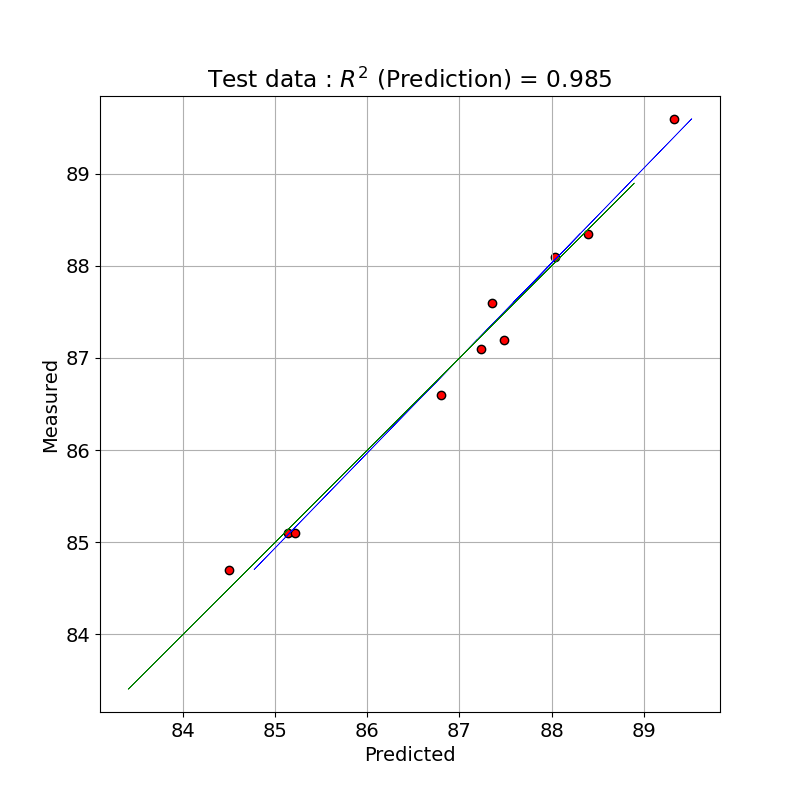
for Test data
R2 pred: 0.985
MSE pred: 0.033

幸い、テストデータでも良いフィッテイングが得られました。

テストデータで PLS のモデルで予測した値と測定値とを単回帰したプロットを示しました。

# Plot regression and figures of merit
rangey = max(y_test) - min(y_test)
rangex = max(y_pred) - min(y_pred)

# Fit a line to the CV vs response
z = np.polyfit(y_test, y_pred, 1)
fig, ax = plt.subplots(figsize=(8, 8))

# Plot the best fit line
ax.plot(np.polyval(z, y_test), y_test, c='blue', linewidth=0.5)

# Plot the ideal 1:1 line
ax.plot(y_train, y_train, color='green', linewidth=0.5)

ax.scatter(y_pred, y_test, c='red', edgecolors='k')
plt.title('Test data : $R^{2}$ (Prediction) = ' + '{:.3f}'.format(score_pred))
plt.xlabel('Predicted')
plt.ylabel('Measured')
ax.axis('equal')
plt.grid()

plt.savefig('octane_004.png')
plt.show()


PLS 回帰における変数選択の改善方法が参考サイト [3] にありますので、今後、確認してみたいと思います。

※ テストデータの評価に間違いがありましたので修正しました。[2023-07-07]

参考サイト

  1. bitWalk's: 【備忘録】Rのplsパッケージの使い方 [2017-06-18]
  2. Partial Least Squares Regression in Python [2018-06-14]
  3. A variable selection method for PLS in Python [2018-07-04]

 

ブログランキング・にほんブログ村へ bitWalk's - にほんブログ村 にほんブログ村 IT技術ブログ オープンソースへ
にほんブログ村

オープンソース - ブログ村ハッシュタグ
#オープンソース


このエントリーをはてなブックマークに追加

2022-11-02

【備忘録】カスタム・スケーラーを作るための…

scikit-learn は、Python のオープンソース機械学習ライブラリです。SVM, Random Forest, Gradient Boosting, k平均法、DBSCAN などを含む様々な分類、回帰、クラスタリングアルゴリズムを備えており、Python の数値計算ライブラリの NumPy, SciPy とやり取りするよう設計されています。

Wikipedia より引用、編集

Python で機械学習を扱うとき、いや、主に主成分分析 (PCA) でデータを整理するときにと、言い直した方が良いような気がするのですが、そんな時に利用するライブラリは scikit-learn のほぼ一択になっています。

前処理でデータを標準化をするときには StandardScaler、すなわち平均値と標準偏差でデータを標準化するスケーラーで十分だと思っていたのですが、よくよく考えてみると、決してそうではないことに気づきました。だとすれば、スケーラーをカスタマイズしたくなりますが、StandardScaler のソースを見て、これをベースにカスタマイズすることを諦めてしまいました。😅

とりあえず、最低限の機能を実装した StandardScaler と同等機能の超シンプルなスケーラーを作って、それをベースにカスタマイズしていくことにしました。

ということで、下記の CustomScaler クラスは、自分の使う範囲では StanbdardScaler と同じ機能しかありませんが、これをベースにカスタムなスケーラを作っていくので、備忘録としました。ま、不具合が出れば StandardScaler のソースを見て手直しを重ねます。😁

test_scaler.py

動作確認用に iris のデータセットを使って、StandardScaler と CustomScaler それぞれで標準化したあと PCA をして、結果をざっくり比較しています(結果が同じになるべきです)。

実行例
>>> Standard Scaler
        PC1       PC2       PC3       PC4
0 -2.264703  0.480027 -0.127706 -0.024168
1 -2.080961 -0.674134 -0.234609 -0.103007
2 -2.364229 -0.341908  0.044201 -0.028377
3 -2.299384 -0.597395  0.091290  0.065956
4 -2.389842  0.646835  0.015738  0.035923
>>> Custom Scaler
        PC1       PC2       PC3       PC4
0 -2.264703  0.480027 -0.127706 -0.024168
1 -2.080961 -0.674134 -0.234609 -0.103007
2 -2.364229 -0.341908  0.044201 -0.028377
3 -2.299384 -0.597395  0.091290  0.065956
4 -2.389842  0.646835  0.015738  0.035923

参考サイト

  1. sklearn.preprocessing.StandardScaler — scikit-learn 1.1.3 documentation
  2. sklearn.decomposition.PCA — scikit-learn 1.1.3 documentation
  3. sklearn.datasets.load_iris — scikit-learn 1.1.3 documentation


ブログランキング・にほんブログ村へ bitWalk's - にほんブログ村 にほんブログ村 IT技術ブログ オープンソースへ
にほんブログ村

オープンソース - ブログ村ハッシュタグ
#オープンソース


このエントリーをはてなブックマークに追加